








 Preview Tour Audio


Like a trusty car and a full tank of gas, these cookies keep everything running smoothly. They power core features like secure login, navigation, and yo


 Top Rated:
Surat local tour
 California
4.9
60678 ratings
$19.99


$19.99
About The Tour
Get an in-depth look at Oahu on the Grand Circle Island Tour! You’ll travel the island stopping at world-renowned surf spots, historic sites, foodie towns, and the famous North Shore.
Here are just a few of the fun things you can do on the tour!
• Watch surfers at Banzai Pipeline
• Hike to a waterfall at Waimea Valley
• Eat garlic shrimp in Kahuku and shave ice in Haleiwa
• Snorkel at Shark’s Cove (no sharks)
• Grab a Dole Whip at the Dole Plantation
KNOW BEFORE YOU GO
Recommended Start Time: 9:00 a.m.
Tour Starting Point(s): Waikiki, Ko Olina or Turtle Bay Resort
Direction: Counterclockwise loop, ending where you began
All Shaka Guide tours come with reliable customer support and a satisfaction guarantee. Tours never expire.
Sample Tour Audio
3 Steps to Buy & Redeem:
Add to Cart & Checkout
Create Account during checkout
Download App & Login
 Gifting Options Available
Reviews
Where is Cuyhoga Valley National Park?
Cuyahoga Valley National Park is located in northeastern Ohio, between the cities of Akron and Cleveland. This beautiful national park showcases the natural beauty of the Cuyahoga River and offers a variety of outdoor activities. On Shaka ...
How Big Is Cuyahoga Valley National Park?
Cuyahoga Valley National Park in Ohio covers an area of approximately 33,000 acres. Shaka Guide’s Cuyahoga Valley National Park Tour will help you make the most of your trip. We’ve selected 24 of our favorite stops in the park including, Cuyah...
When Was Cuyahoga Valley National Park Founded?
Cuyahoga Valley National Park was designated as a national recreation area in 1974 and later redesignated as a national park in 2000 to preserve and protect the natural, cultural, and recreational resources found in the Cuyahoga River Valley. ...
What is an Audio Tour Guide?
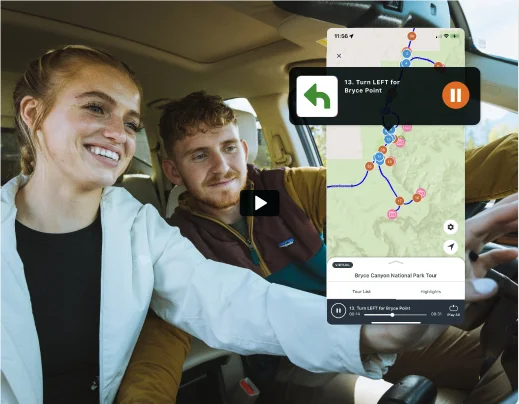
Think of us as your personal tour guide in an app. Our tours provide everything a guided tour does, but with the freedom to explore on your terms. Here’s how it works:
- GPS triggers audio narration to play automatically as you drive or walk.
- Listen to stories, get local insights, visit must-see stops and get turn-by-turn navigation.
Tour FAQs
The best way to make sure that everyone in the car can hear the tour nice and loud is to play the audio tour through the car stereo. Make sure one of these methods works before leaving the car rental lot. Rental Agents will willingly change your car if the car stereo does cannot play from your phone.
Depending on which rental car you have, this can be done in one of three ways:
1) Audio Aux Jack
Many rental cars have an audio auxiliary jack. This slot in the cars looks just like something you would plug your headphones into. But in order to play your phone’s audio through the car speaker you need an auxiliary jack with two male ends: one plugs into your phone, the other plugs into the car. You can adjust volume from both the car radio and the phone’s volume.

If you do not have an audio aux jack, try the following methods.
2) USB Cable
Depending on the make and model of your car, sometimes you are able to sync your phone’s audio through a USB cable, that is also charging your phone at the same time. You can usually find a USB plug somewhere near the driver’s seat. The most likely place to find it is in the middle glove compartment, on the car dash or near the audio control panel.
Connect the USB to car stereo
From car stereo, select “media player” or find the name of your device.
Look for signs of connectivity through the display on your car dash.
Play any of the tour audio to test if the audio plays correctly from the speakers.
- USB still not playing audio?
Try some of the following, testing the audio after each attempt
Restart your device and restart your car.
Connect your device to a different stereo USB port (if you have one).
Try a different USB cable.
Update your device firmware.
Try playing audio from a different app to see if any audio will play.
If still not working then try the other methods.
NOTE: Playing audio through the USB cable in many types of older rental cars tends to not work for reasons related to a damaged USB port or car’s stereo firmware.
3) Bluetooth
Depending on the make and model of your car, sometimes you can sync your phone’s audio through a bluetooth connection. Here are the steps:
First go to your phone’s bluetooth and turn it on.
Then in your rental car, use your car’s dash (often the radio) to activate bluetooth connection of the car.
When you see your phone, select it to complete the bluetooth connection.
Play any of the tour audio to test if the audio plays correctly from the speakers.
If you run into problems with your rental car, it’s best to refer to the car’s user manual or ask a car rental representative to help you. Every car make and model handles bluetooth differently, and not every rental car has bluetooth.
Bluetooth still not working?
Try some of the following to troubleshoot:
Restart your device
Make sure your device’s Bluetooth is turned to ON (check your settings)
Unpair both your device and car stereo from each other, restart your car, and then try to pair and connect your device again.
NOTE: In some older rental cars bluetooth appears to be connected but still doesn't play audio. Again, likely something not working with the car's bluetooth system. Try other methods.
Still can’t get audio to play through the car stereo?
Just use your device’s built in speakers and turn the volume up as loud as you can. This may require disconnecting your USB cable from the Car Stereo.
Before a tour is purchased, the app uses the internet or data to display the map, images, and play sample audio. However, after a tour is purchased and downloaded it works 100% offline. This includes the map, audio directions, as well as tour highlights.
If you are concerned about your data usage, simply turn your phone on “airplane mode” while taking the tour. This will turn off your data while leaving your GPS signal on. But again, this is only needed if you are nervous about using data.
Note: Some older Android devices when turn on airplane mode will turn off your GPS signal. If this is the case for you, then go to your settings and only turn off Cellular Data and WiFi and keep GPS or Location on.
Shaka Guide’s audio tours play automatically based on your GPS location.
After you purchase a tour, click on “Take the Tour”. From there it will give you some tutorial screens with audio guidance to:
Help get your audio set up and connected to the car
Directions to the start of the tour. (requires Data connection for this)
From there, just follow the directions. Once you arrive at the start of the tour, the audio tour narration will kick on and start talking to you. From there, the tour will give you turn-by-turn directions to an all day of fun!
We use your phone’s GPS to play audio narration at just the right time and place. It’s like having a “virtual” tour guide with you, while giving you the complete freedom to tour at your own pace!
Note: If you are not close to a tour starting point you can also join the tour anywhere along the tour route going in the same direction as the tour. Just drive to the nearest point and the tour will start to play! If you need technical assistance, please call our support # 1-888-250-2261.
Do you have other questions that we didn’t list here? Please feel free to email us direclty: aloha@shaka.guide
You can also contact our Tech Support number from 7am - 7pm Hawaii Standard Time: 1-888-250-2261.
You can also send us message through Facebook: @ShakaGuide We will be glad to answer your questions!
Nearby Tours
NEW

California
Surat local tour
POPULAR

California
Joshua Tree National Park Tour
POPULAR

California
Death Valley National Park Tour
POPULAR

California
Yosemite National Park Tour
POPULAR

Nevada
Lake Tahoe Driving Tour
Surat local tour
$19.99
3 Steps to Buy & Redeem:
Add to Cart & Checkout
Create Account during checkout
Download App & Login
Gifting Options Available
Join the Ride!
Our next stop - your inbox! Subscribe to our email list for travel tips, inspiration, special offers, and more!
About Us
At Shaka Guide our goal is to connect people, with places, through stories. Our team creates immersive, self-guided audio tours that connect travelers with the history and culture of over 85 destinations across the country.



© Shaka Guide LLC 2025
We use cookies  to fuel your ride
We use cookies to fuel
your ride